
Introduction to Dhee
Modern AI engineering requires far more than dispatching raw prompts to LLM providers. Production systems suffer from vendor downtime, prompt divergence, tool permission drift, and unvalidated outputs.
Dhee solves this by sitting between your application and underlying intelligence providers as an Adaptive AI Orchestration Layer. For every incoming request, Dhee executes an automated pipeline:
Verified expert workflows defining instructions & rules.
Guarded capability execution bound by security policy.
Purpose-built intelligence profiles shielding vendor churn.
Rigorous input and output schema assertion prior to delivery.
API Quickstart
Send your first request to the gateway in under 2 minutes. Requests use standard OpenAI-compatible payloads, authenticating via your Project API Key.
cURL Example
curl https://ai.dheelab.com/v1/chat/completions \
  -H "Authorization: Bearer dh_live_YOUR_PROJECT_KEY" \
  -H "Content-Type: application/json" \
  -H "Idempotency-Key: req_2026_001" \
  -d '{
    "model": "dheeman-auto",
    "messages": [
      {"role": "system", "content": "You are a concise enterprise assistant."},
      {"role": "user", "content": "Draft a 2-sentence explanation of adaptive AI orchestration."}
    ],
    "max_tokens": 120,
    "temperature": 0.2
  }'
Python Example (OpenAI SDK Compatible)
from openai import OpenAI

client = OpenAI(
    api_key="dh_live_YOUR_PROJECT_KEY",
    base_url="https://ai.dheelab.com/v1"
)

response = client.chat.completions.create(
    model="dheeman-auto",
    messages=[
        {"role": "system", "content": "You are a concise enterprise assistant."},
        {"role": "user", "content": "Draft a 2-sentence explanation of adaptive AI orchestration."}
    ],
    max_tokens=120,
    temperature=0.2
)

print(response.choices[0].message.content)
Authentication & Key Security
All gateway endpoints require HTTP Bearer token authentication via the standard Authorization: Bearer <key> header.
Project Key Format
Keys follow the pattern: dh_live_... for production or dh_test_... for development sandboxes.
Project Isolation
Each key is strictly bound to an individual Project. Usage, concurrency, and spend limits are isolated without data leakage.
How Dhee Works: The 8-Stage Lifecycle
- Intent Understanding: Parses incoming message context to infer objective requirements, task category, and required domain expertise.
- Skill Selection: Matches prompt features against the verified skill registry to identify compatible expert procedures.
- Skill Composition: Merges single or multi-skill workflows into a unified instruction sequence.
- Tool Binding: Binds authorized function tools and enforces security sandboxing.
- Dheeman Model Selection: Resolves cognitive depth requirements to select the optimal virtual model.
- Provider Routing: Evaluates provider availability, p95 latency, and active rate limits to dispatch across upstream nodes.
- Automated Resilience: Automatically re-routes without connection loss if an upstream provider fails.
- Output Validation: Verifies schema conformity and structural constraints prior to returning to the caller.
Dheeman Auto
Setting model: "dheeman-auto" delegates intelligence depth
decisions to Dhee's zero-overhead deterministic heuristic classifier. Simple classification
tasks run on high-throughput engines, while intricate STEM and multi-step tasks are promoted to
deep reasoning profiles.
Skills & Capabilities
Skills are pre-verified domain workflows containing specialized procedures, boundary constraints, and evaluation criteria. When combined with sandboxed tools, skills transform raw language models into grounded, domain-specific problem solvers.
Use Skills Automatically
You do not need an install button or a skill slug. Send a plain-language task to Dheeman Agent. A published, entitled skill can run immediately. An eligible missing skill may be prepared from a trusted administrator-approved source; unverified content never runs.
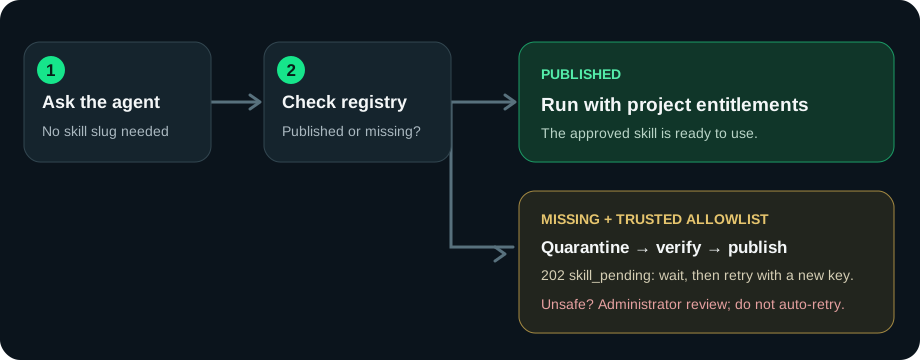
- Send
POST /v1/dheeman-agent/runswith atask. Theskillfield is optional. - If
data.statusisskill_pending, wait at leastretry_after_seconds. No agent run has started yet. - For
discoveringorpreparing, repeat the task with a new Idempotency-Key. The old key replays the pending response. - For
review_required, contact an administrator. Do not retry automatically.
Only exact allowlisted slugs on trusted sources can enter on-demand preparation. Clean, text-only,
tool-free packages with a passed verification and a known commercially usable license may
auto-publish. The project’s entitlement rules still apply. Direct
/v1/skills/{slug}/run and ordinary chat completions do not
trigger this download flow.
Dheeman Agent: multi-step tasks
Dheeman Agent runs a task through a project-scoped workflow with eligible skills, conversation context,
and approval-gated tool actions. It uses Dheeman Auto to select a serving model for each step.
For a simple one-off answer, use dheeman-auto with
POST /v1/chat/completions. Setting the chat model to
dheeman-agent does not start an agent run.
- Send a plain-language
task; optionalinputsupplies structured context. - Omit
skillfor automatic eligible-skill selection, or pin a published skill slug. - Use
pipeline: "auto"andexecution_mode: "auto"unless you need a specific mode. - Reuse the returned
conversation_idin follow-up tasks to retain scoped conversation context.
curl https://ai.dheelab.com/v1/dheeman-agent/runs \
  -H "Authorization: Bearer dh_live_YOUR_PROJECT_KEY" \
  -H "Content-Type: application/json" \
  -H "Idempotency-Key: agent-task-001" \
  -d '{"task":"Review my website SEO and suggest the three most important fixes.","input":{},"pipeline":"auto","execution_mode":"auto"}'
A started run returns a run_id,
conversation_id, status, output, steps, and aggregate usage.
Poll GET /v1/dheeman-agent/runs/{run_id} for asynchronous runs.
A protected tool call remains waiting_approval until an
authorized key with the agents.approve scope approves or rejects it.
A proposed action is not a completed action.
A pending HTTP 202 response has success: true,
data.status: "skill_pending",
data.reason, and
data.retry_after_seconds, but no
run_id. A normal asynchronous run can also return HTTP 202;
inspect the response body rather than the HTTP status alone.
Brain pipeline: plan, work, verify
With pipeline: "auto", simple requests use a single pass.
Images, an acceptance schema, or sufficiently complex text select Brain. It plans, optionally extracts
visual evidence, completes up to three focused subtasks, drafts an answer, verifies it, and makes at most
one targeted repair attempt. A still-invalid answer is not reported as successful. Brain normally runs
asynchronously; poll the returned run ID. Each model call is billed separately. Published, entitled skills
can guide subtasks, but Brain does not execute skill tools or approval-gated actions; use the standard
Agent pipeline for actions. PDF and audio inputs are not supported here yet.
curl https://ai.dheelab.com/v1/dheeman-agent/runs \
  -H "Authorization: Bearer dh_live_YOUR_PROJECT_KEY" \
  -H "Content-Type: application/json" \
  -d '{"task":"Describe only visible product features.","input":{"image_url":"data:image/jpeg;base64,BASE64_IMAGE"},"pipeline":"auto","execution_mode":"auto"}'
Replace BASE64_IMAGE with actual base64-encoded JPEG bytes, not a file path or remote URL.
Structured acceptance schema
Put a template object or a supported JSON Schema in input.acceptance_schema.
Supported JSON Schema rules include types, nested properties, required fields, arrays/items, enum, bounds,
and additionalProperties. Unsupported advanced keywords return HTTP 422 before model calls. A failed final
verification remains failed, but run inspection now includes a safe error reason.
{"task":"Inspect the image and prepare a factual product draft.","input":{"image_url":"data:image/jpeg;base64,BASE64_IMAGE","acceptance_schema":{"type":"object","properties":{"title":{"type":"string"},"material":{"type":["string","null"]}},"required":["title","material"],"additionalProperties":false}},"pipeline":"auto"}Answer questions and continue the same run
Brain asks only if a missing fact is essential to proceed safely; facts that can remain null should not
trigger a question. A paused run returns status: "awaiting_input"
and an ordered questions array. Send one answer per question, in
order. The same run resumes from completed checkpoints, so do not start a new run or resend the image.
Brain permits at most two clarification rounds and three questions per round.
{"run_id":"RUN_ID","status":"awaiting_input","pipeline":"brain","questions":["What is the approved selling price?"],"output":null}curl https://ai.dheelab.com/v1/dheeman-agent/runs/RUN_ID/answer \
-H "Authorization: Bearer dh_live_YOUR_PROJECT_KEY" \
-H "Content-Type: application/json" \
-d '{"answers":["The price is not decided; leave it null."]}'
HTTP 202 returns the same run as pending. Poll GET /v1/dheeman-agent/runs/{run_id}
for its next status. Use a key for the same project and user context as the original run. Wrong state returns HTTP 409; invalid answer
count returns HTTP 422.
Optional completion webhook
A run can include "callback":{"url":"https://your-app.example/webhooks/dheeman","secret":"a-random-secret-of-at-least-32-characters"}.
The URL must be public HTTPS. Events are sent for awaiting_input, waiting_approval, succeeded and failed.
Verify X-Dhee-Signature as HMAC-SHA256 over the raw JSON body with your
secret, deduplicate using X-Dhee-Event-Id, and return 2xx. Delivery can
retry; polling remains the source of truth if the callback is delayed.
POST /v1/audio/transcriptions
Batch speech-to-text for dheeman-stt. Send multipart form data with a required PCM WAV file (up to 25 MB and 10 minutes), an optional model tier, and an optional two-letter language code. The synchronous JSON response contains text, model, duration, timed segments (start/end/text), and request_id. Set require_timestamps=1 to reject untimed responses. An optional vocabulary_hint can guide spelling of names and terms, but audio review is still needed for factual accuracy. This is not the streaming Live API; audio sent to chat completions is rejected. A published AUDIO_HOUR retail price and a healthy batch transcription route are required.
POST /v1/chat/completions
OpenAI-compatible chat completion endpoint supporting tools, schemas, and streaming.
Request Parameters
| Parameter | Type | Required | Default | Description |
|---|---|---|---|---|
| model | string | No | "dheeman-auto" | Virtual model slug (e.g. dheeman-auto, dheeman-flash, dheeman-pro, dheeman-coding). |
| messages | array | Yes | — | Array of conversation message objects with role (system, user, assistant, tool) and content. |
| temperature | number | No | 0.2 | Sampling temperature between 0.0 and 2.0. Lower values produce deterministic responses. |
| max_tokens | integer | No | 1024 | Maximum generation output tokens. Also accepts max_completion_tokens. |
| stream | boolean | No | false | When true, delivers response chunks via Server-Sent Events (SSE) ending with data: [DONE]. |
| tools | array | No | null | Up to 32 function tool definitions for assistant function calling. |
Streaming Responses (SSE)
Pass "stream": true to receive real-time Server-Sent Event
chunks. Each event contains partial token deltas and telemetry headers.
Error Codes & Resilient Handling
| Status | Code | Meaning |
|---|---|---|
| 400 | invalid_request_error | Malformed JSON body or invalid parameter type. |
| 401 | authentication_error | Missing or invalid Bearer API key. |
| 402 | payment_required | Account credits depleted or payment failure. |
| 403 | permission_denied | API key does not have access to requested model or project. |
| 404 | not_found_error | Requested model slug or resource does not exist. |
| 429 | rate_limit_error | RPM, TPM, concurrency lease, or monthly budget cap exceeded. |
| 502 | bad_gateway | Upstream provider failure and standby failover routes exhausted. |
| 503 | service_unavailable | Temporary cluster maintenance or capacity saturation. |
Rate Limits & Tier Quotas
Requests are rate-limited on sliding windows. Limits are communicated via standard response headers:
x-ratelimit-limit-requests: Maximum requests per minute allocated to your tier.x-ratelimit-remaining-requests: Requests remaining in current window.x-ratelimit-limit-tokens: Maximum tokens per minute allocated to your tier.Retry-After: Seconds to wait before re-attempting a throttled request.